Mobile Banking

Bank Wherever Life Takes You.

Digital Banking

Mobile Banking Wherever Life Takes You.

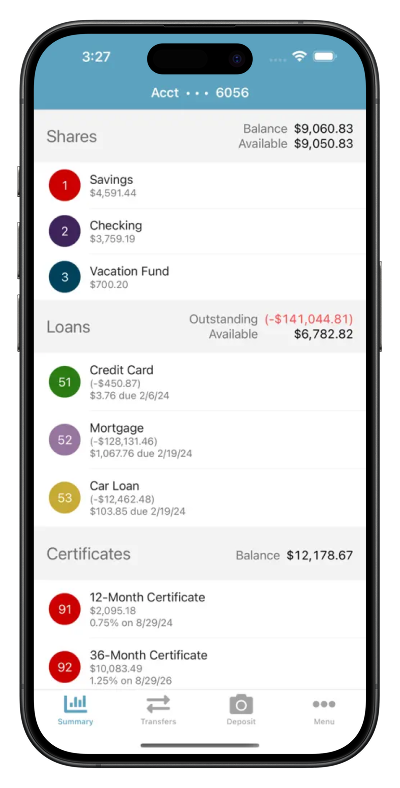
Whether you’re depositing a check from your driveway, checking your balance while shopping, paying a bill during your lunch break, or transferring money between accounts, the Campus Credit Union Mobile Banking app helps you stay connected to your finances wherever you are.

Your money should be as mobile as your life.

_______

Bank from Your Phone with Confidence

Life doesn’t stop when you’re away from your computer.

For generations, Campus Credit Union has helped Wichita-area members manage their finances with confidence. Mobile Banking extends that same trusted experience by putting secure banking tools in the palm of your hand.

Whether you’re across town or across the country, your accounts are always within reach.

Everything You Can Do with Mobile Banking

Mobile Deposit

Great For: Depositing checks without visiting a branch.

Use It To

  • Deposit checks remotely
  • Save trips to the branch
  • Submit deposits when it fits your schedule
  • Deposit eligible checks securely

Key Features

  • Mobile Deposit
  • Deposit confirmation
  • Secure image capture
  • Deposit history

Why Members Choose It

Mobile Deposit saves time by letting members deposit eligible checks from almost anywhere using their mobile device.

Mobile Account Management

Great For: Everyday banking from your phone.

Use It To

  • Check balances
  • Review transactions
  • Transfer money between eligible accounts
  • Pay bills

Key Features

  • Secure login
  • Account balances
  • Transaction history
  • Quick transfers

Why Members Choose It

Whether you’re standing in line or traveling across the country, Mobile Banking keeps your finances within easy reach.

Alerts & Notifications

Great For: Staying informed about your accounts.

Use It To

  • Monitor balances
  • Track transactions
  • Receive account alerts
  • Stay informed about account activity

Key Features

  • Account alerts
  • Balance notifications
  • Transaction notifications
  • Security alerts

Why Members Choose It

Available account notifications can help members stay aware of account activity and identify unusual transactions sooner.

Secure Mobile Access

Great For: Banking confidently from your phone.

Use It To

  • Sign in securely
  • Protect your login credentials
  • Use available authentication features
  • Access your accounts from a trusted device

Key Features

  • Encrypted connections
  • Biometric login
  • Secure authentication
  • Fraud protection tools

Why Members Choose It

Members appreciate the convenience of Mobile Banking without sacrificing security.

Your phone can become one of your strongest financial management tools. Regularly reviewing balances, turning on account alerts, and using secure login features can help you stay informed, protect your accounts, and manage your money with confidence wherever you are.

_______

Why Members Love Mobile Banking

Bank Wherever You Are

Manage your money whenever and wherever it’s convenient for you.

Deposit Checks from Anywhere

Deposit eligible checks from almost anywhere using your mobile device.

Stay Connected

Stay informed with account alerts and convenient access to your balances and transactions.

Backed by Local Support

When you have questions, our Wichita-area team is ready to help by phone, online, or in person.

Your Credit Union, In Your Pocket

Powerful, simple and safe. Manage every part of your financial life from a phone, tablet or laptop — 24/7.

Mobile Banking

See balances, move money, and pay bills.

Transfer Funds

Between internal and external accounts.

Mobile Deposit

Deposit checks from anywhere.

Find Free ATMs

Surcharge-free ATMs close to you.

Bill Pay

One-time or recurring payments.

Apply for Loans

Easily apply for loans on your device.

_______

Frequently Asked Questions

How do I download the Mobile Banking app?

Download the Campus Credit Union Mobile Banking app from the Apple App Store or Google Play. Once installed, log in using your Online Banking credentials or enroll if you’re a first-time user.

Yes. Mobile Banking uses multiple layers of security to help protect your information. Learn more about Security & Fraud Protection.

Yes. Mobile Deposit allows eligible members to deposit checks using their mobile device. Learn more about Mobile Deposit.

Yes. Eligible members can schedule and manage payments through Bill Pay within Mobile Banking.

Yes. Members can transfer funds between eligible accounts and, if available, other linked accounts. Learn more about Transfers.

If your device is lost or stolen, contact Campus Credit Union as soon as possible. You can also review recommended steps on our Security & Fraud Protection page.

Banking That Moves with You.

Whether you're depositing checks, paying bills, transferring money, or simply checking your balance, the Campus Credit Union Mobile Banking app helps you manage your money securely wherever life takes you.

When you click Continue, you will be leaving the Campus Credit Union website.

You are being directed to a third-party website that is not owned, operated, or controlled by Campus Credit Union. These links are provided solely as a convenience. Campus Credit Union does not endorse, guarantee, or assume responsibility for the content, products, services, or security of external sites.

The privacy and security policies of the linked website may differ from those of Campus Credit Union. We encourage you to review those policies before providing any personal or financial information.

Select Continue to proceed to the external website, or Cancel to return to the Campus Credit Union website.